Read and work through the linked tutorial. Upon completion, save the class you created in the tutorial in the x:\ in either 1B or 4B respectively, and in a folder called Lesson 9 (Create this folder if it does not already exist). Name the class yourlastname_SpinningHare. Also save the program named Alice 0150b specified in the tutorial in the same folder with yourlastname_alice150b
Tuesday, February 23, 2010

Sunday, February 21, 2010
World Level Methods (Assignment 8)
Read and work through the following tutorial. After reading and working through the linked tutorial. Complete the following lab project.
Lab project
Beginning with the program named Alice0145b, create a new program.
The behavior of the new program is the same as the behavior of the original program except that the program asks the user to enter two numeric values. The first numeric value is the distance that the penguins are to move. The second numeric value is the distance that the cows are to move.
Modify the original program to solicit these two numeric values from the user and to use the two numeric values to control the distance moved by the penguins and the cows.
Save your world in a file named Alice145LabProjA.a2w and be prepared to deliver it to your instructor in whatever manner the instructor specifies.
Make certain that your preferences are set to Java Style in Color.
Select Export Code For Printing... on the File menu and save your source code in a file named Alice145LabProjA.html. Save this file to the x:\ in the Lesson 8 folder for the appropriate block.
Wednesday, February 10, 2010
Alice - - Day 7
Functions that Return Values
Read through the linked tutorial
Lab Project
Complete the following lab, save to the X:\ in the proper class folder
Read through the linked tutorial
Lab Project
Complete the following lab, save to the X:\ in the proper class folder
Begin with the program named Alice0135b created through the tutorial.
Create and add a new function belonging to the Coach object named getChicken.
Update the main method to that shown in Listing 3.
Listing 3. Updated main method for Alice135LabProjA.a2w.
| ||||||||||||||||||
When you play your world, it will display the distance from the coach to the chicken as shown in Figure 4 (it is not necessary to match the value of the distance shown in Figure 4). Then the chicken will turn to the right, making two complete revolutions around its own green axis.
Save your world in a file named Alice135LabProjA.a2w and be prepared to deliver it to your instructor in whatever manner the instructor specifies.
Make certain that your preferences are set to Java Style in Color.
Select Export Code For Printing... on the File menu and save your source code in a file named Alice135LabProjA.html. Also be prepared to deliver this file to your instructor in whatever manner the instructor specifies.
_______________________________________
Data Types and Variables
Read through the linked tutorial
Lab Project
Create a new world using the grass template. Place a Coach object in the world.
Rename the default method main. The method named main must be empty except for comments and a call to a world-level method named processData.
Write the code in the method named processData to do the following:
- Get the coach's name from the user as shown in Figure 8 and store the name in a variable of type String named coachesName.
- Display the coach's name for five seconds as shown in Figure 9.
- Get the coach's age from the user as shown in Figure 10 and store the age in a variable of type Number named coachesAge.
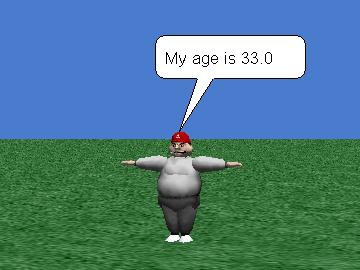
- Display the coach's age for five seconds as shown in Figure 11.
Figure 8. Input dialog for coach's name.
| |
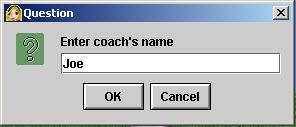
Figure 9. Program output for coach's name.
| |
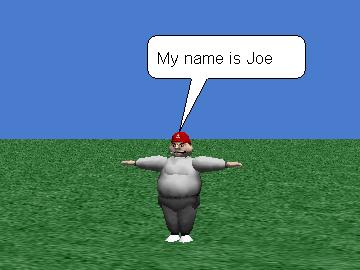
Figure 10. Input dialog for coach's age.
| |
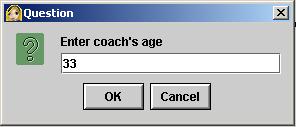
Figure 11. Program output for coach's age.
| |
Save your world in a file named Alice140LabProjA.a2w and save to the X:\ in the proper class folder.
Make certain that your preferences are set to Java Style in Color.
Select Export Code For Printing... on the File menu and save your source code in a file named Alice140LabProjA.html. Also be prepared to deliver this file to your instructor in whatever manner the instructor specifies.
Subscribe to:
Comments (Atom)